


Schema markup for cleaning companies. When someone searches for a cleaning service on Google, the listings that appear with star ratings, business hours, and service area details are not getting those extras because they rank higher. They are getting them because their websites have schema markup, structured code that tells Google exactly what the business is, what it does, and what clients think of it.
Most cleaning websites have no schema at all. Of those that do, most have it configured incorrectly using the wrong business type, missing required properties, or following guides that recommend schema types Google stopped supporting in 2026. This guide fixes all three problems.
Everything here is achievable through RankMath’s free tier, no code writing, no theme file editing, no developer needed. Where RankMath has gaps for cleaning-specific needs, the free WPCode plugin fills them.
Table of Contents
1. What Does Schema Markup Actually Do for a Cleaning Business Website?
| KEY ANSWER Schema markup is code you add to your cleaning website that tells Google exactly what your business is, what services you offer, where you operate, and what clients think of you. It does not directly boost rankings, but it improves how your listing appears in search results and feeds AI search systems. |
1.1. The three visible things schema changes in Google search results
Before a cleaning client clicks on your website in search results, they see your listing. Schema markup changes what that listing shows. Three things appear differently when the schema is correctly implemented:
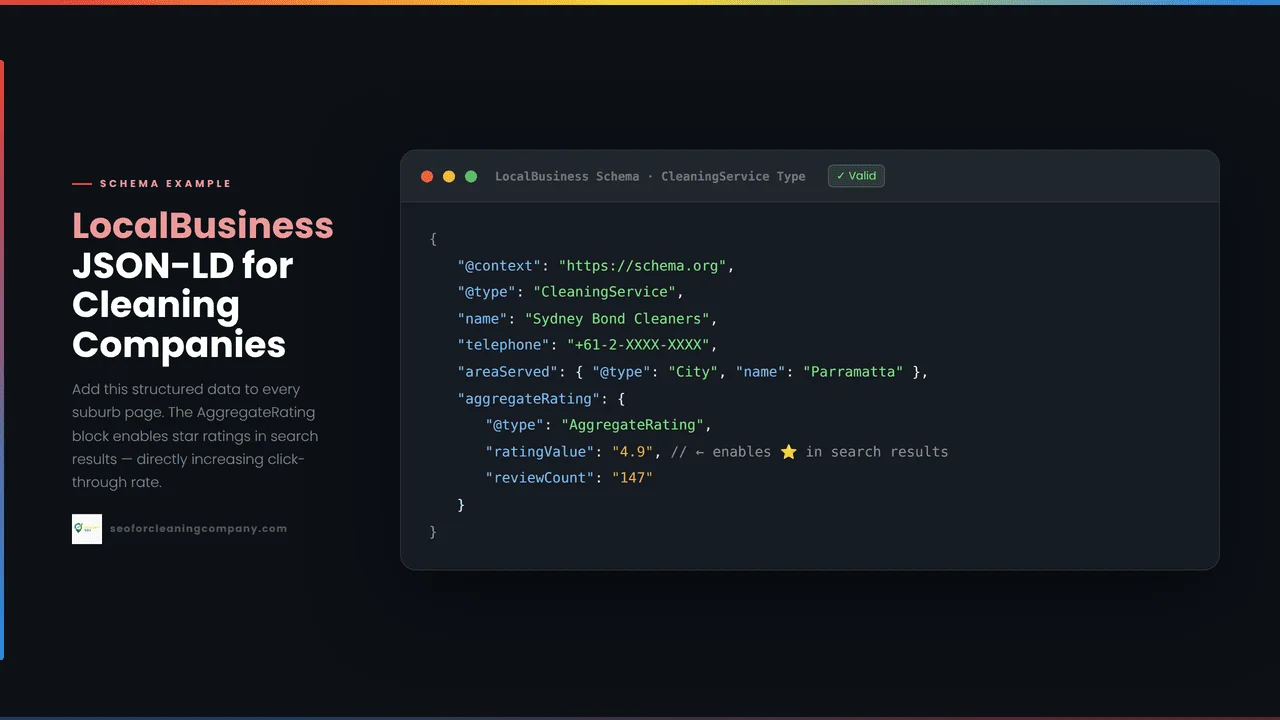
Star ratings under your listing: AggregateRating schema pulls your average review score and total review count directly into the search result listing. A cleaning business with 4.8 stars and 147 reviews, displayed in gold stars below the page title, receives significantly more clicks than the same listing without star ratings even when ranking in the same position.
Business hours and contact details: LocalBusiness schema enables Google to display your opening hours, phone number, and service area directly in the search result, sometimes without the user needing to click through to your website at all. For mobile cleaning searches, this means a client searching on their phone sees your hours and taps to call directly from the search results page.
Knowledge panel information: When Google has high confidence in your business identity through consistent schema, GBP data, and citation signals, it may display a knowledge panel on the right side of search results showing your business name, category, rating, and contact details. Schema is one of the signals that builds this confidence.
1.2. How schema feeds AI Overviews and Ask Maps recommendations
In 2026, schema markup has extended importance beyond traditional search results. Google’s AI Overview feature generates summaries that cite specific businesses. Ask Maps (launched March 2026) uses conversational AI to recommend cleaning businesses in response to natural language queries. Both systems read structured data as an entity verification signal confirming that your business is what it claims to be, operates where it claims to operate, and offers the services it claims to offer.
A cleaning business with complete, correctly typed schema markup is more likely to be cited in AI Overviews and recommended by Ask Maps than an identical cleaning business with no schema. The structured data gives the AI system the clear, machine-readable entity signals it needs to include your business in recommendations with confidence.
1.3. What cannot the schema do?
Schema is not a direct ranking factor, as it does not move your cleaning website from position 5 to position 1 for ‘house cleaning Sydney.’ It is an eligibility signal and a trust signal. It makes rich results possible; it does not guarantee them. It strengthens entity signals; it does not replace content quality, review velocity, or GBP optimisation. Implement schema as one layer in a complete local SEO strategy not as a standalone ranking intervention. Always follow Google Structured Data Guidelines to ensure schema compliance
2. Schema Markup for Cleaning Companies: Which Schema Type Should You Use?
| KEY ANSWER Use CleaningService as your primary schema type not the generic LocalBusiness. CleaningService is a specific subtype of LocalBusiness that tells Google exactly what trade you are in. It inherits all LocalBusiness properties while adding cleaning-specific categorisation that strengthens local search relevance. |
2.1. The CleaningService type hierarchy
Schema.org organises business types in a hierarchy. At the top is Thing, then Organisation, then LocalBusiness. Within LocalBusiness sits HomeAndConstructionBusiness, the category for trade and service businesses that operate in clients’ homes or properties. Within HomeAndConstructionBusiness sits CleaningService the specific type for businesses that provide cleaning as their primary service.
When you declare your business as CleaningService, Google understands everything that LocalBusiness provides: name, address, hours, phone, plus the more specific categorisation signal that you are a cleaning business operating in the home services trade. This additional specificity strengthens Google’s ability to match your listing to cleaning-specific queries, particularly suburb-level residential and commercial cleaning searches.
2.2. Why CleaningService outperforms generic LocalBusiness
Google uses @type as a primary signal for business categorisation in local search. A cleaning business declared as LocalBusiness competes in the same category pool as every other local business, restaurants, hairdressers, and accountants. A cleaning business declared as CleaningService is categorised specifically within the home services trade, which aligns with the category of queries ‘house cleaning near me,’ ‘bond cleaning Newtown’ that cleaning business owners want to appear for.
The analogy: using LocalBusiness for a cleaning company is like ticking ‘business’ when you could tick ‘cleaning company.’ Google can figure out the former from your content; the latter is a direct, unambiguous signal.
2.3. Which cleaning verticals use CleaningService
All of them. Residential house cleaning, bond cleaning, end-of-lease cleaning, commercial office cleaning, carpet cleaning, window cleaning, pressure washing, and maid service all use CleaningService as their primary @type. There is no separate schema type for carpet cleaning or commercial cleaning within the schema.org vocabulary. Cleaning Service covers every cleaning vertical. Add your specific services using the Service schema and the hasOfferCatalog property (covered in Section 6).
2.4. The five required properties every CleaningService block must include
- @type: CleaningService (not LocalBusiness, not HomeAndConstructionBusiness)
- name: Your exact business trading name must match your GBP listing exactly
- telephone: Your primary contact number, including country code
- url: Your website homepage URL
- address OR areaServed: PostalAddress for shopfront businesses; areaServed list for service area businesses (covered in Section 3)
3. How Do You Configure Schema for a Cleaning Business That Has No Shopfront Address?
| KEY ANSWER Cleaning businesses operating without a commercial premise are Service Area Businesses. In your schema, omit the streetAddress field and use areaServed instead, listing every suburb or city you serve. Include GeoCoordinates pointing to your operational area centre, not your home address. |
The majority of independent cleaning businesses, residential house cleaners, bond cleaning operators, and mobile carpet cleaners operate from a home address they do not want to display publicly. Many have already configured their Google Business Profile as a Service Area Business, hiding their home address from the public listing. Their schema should reflect this same configuration.
3.1. When to use areaServed instead of streetAddress
If your cleaning business does not receive clients at a physical address, if you travel to your clients rather than having clients visit you, use areaServed and omit the streetAddress, addressLocality, and postalCode fields. Including a home address in your schema when you have hidden it from your GBP creates a NAP inconsistency that weakens your local authority signals. Schema and GBP must tell the same story.
3.2. How to build your area served list
In your schema, areaServed lists the geographic areas you serve. For a cleaning business in Australia, list individual suburb names. For a US cleaning business, list city and neighbourhood names. For a UK cleaning business, list borough names in London or city names in regional markets.
| areaServed example — AU bond cleaning business (Sydney suburbs)“areaServed”: [ {“@type”: “City”, “name”: “Newtown”}, {“@type”: “City”, “name”: “Surry Hills”}, {“@type”: “City”, “name”: “Chatswood”}, {“@type”: “City”, “name”: “Parramatta”}] |
List every suburb you actively serve and where you have completed jobs. Do not inflate this list with suburbs you cannot realistically reach this creates a mismatch between your schema service area and your GBP service area that weakens both.
3.3. GeoCoordinates for SABs: what coordinates to use
Even without a fixed address, include GeoCoordinates in your schema. For a SAB, use the coordinates of the approximate centre of your primary service area, the coordinates of the suburb or postcode where you complete the most jobs, or the coordinates of the central suburb in your service area list.
You can find coordinates for any suburb or city using Google Maps: search the suburb name, right-click the map at the centre of the suburb, and select ‘What’s here?’ The coordinates appear at the bottom of the screen. Use these in your schema’s geo property as latitude and longitude values.
3.4. How your schema SAB configuration should match your GBP
Your schema and GBP must be consistent. If your GBP hides your address and lists Sydney’s Inner West as your service area, your schema should have no streetAddress and an areaServed list covering Inner West suburbs. If your GBP shows a commercial address (a co-working space or registered business address), your schema should include that same address in its PostalAddress block. Inconsistency between the schema and GBP is one of the most common local SEO signals that weakens entity resolution.
4. How Do You Add CleaningService Schema to a WordPress Website Using RankMath?
| KEY ANSWER In RankMath: go to RankMath > Titles & Meta > Local SEO. Enable the Local SEO module. Select CleaningService as your business type from the dropdown. Fill in your business name, phone, service area, hours, and logo URL. Save. RankMath generates and injects the JSON-LD automatically no code required. |
RankMath’s free tier includes a Local SEO module that generates and injects CleaningService JSON-LD schema across your entire WordPress website automatically. It is the fastest available path to correct schema implementation for a cleaning business owner with no coding experience. Follow these five steps exactly.
| 1 | Activate the Local SEO moduleIn your WordPress dashboard, go to RankMath > Dashboard. Scroll down to the Modules section. Find ‘Local SEO’ and toggle it to Active. If you do not see it, go to RankMath > General Settings > enable Local SEO from the module list. Save changes. |
| 2 | Select CleaningService as your business typeGo to RankMath > Titles & Meta > Local SEO. The first field is Business Type. Click the dropdown and search for ‘CleaningService.’ Select it. This is the most important step if RankMath defaults to LocalBusiness or any other type, your schema uses the wrong @type for a cleaning business. |
| 3 | Complete the business information fields. Fill in: Business Name (exactly as it appears on your GBP), Business Phone (include country code: +61 for AU, +1 for US, +44 for UK), Business URL (your homepage), Logo URL (copy the URL of your logo from WordPress Media Library > click logo image > copy URL). For Address: if you are a SAB, leave the Address fields blank and scroll to the Service Areas section, enter your suburb list there. If you have a commercial address, fill in the Address fields. |
| 4 | Set opening hours. Scroll to the Opening Hours section. For each day you accept bookings, select the day, set the opening time, and set the closing time. For a cleaning business available Monday to Saturday, 7 am to 6 pm: enable Mon–Sat, set 07:00–18:00. For Sunday availability, enable Sunday with appropriate hours. For public holidays where you do not operate, leave those days disabled. Accurate hours in the schema must match your GBP hours; an inconsistency weakens entity signals. |
| 5 | Verify the output using Rich Results Test. After saving, go to search.google.com/test/rich-results. Enter your homepage URL and run the test. Look for a LocalBusiness or CleaningService result in the Detected Structured Data section. Click through to verify: @type shows CleaningService, name matches your GBP name, and telephone is present and correct. If any field shows an error (red), return to RankMath and correct it. A warning (orange) is acceptable; it means optional properties are missing, but required properties are valid. |
Alternative path: WPCode plugin for JSON-LD without theme editing
If RankMath does not offer CleaningService in its dropdown (this occurs on some older RankMath versions), or if you need to add schema properties that RankMath does not support (such as hasOfferCatalog for service listings or sameAs for platform URLs), use the free WPCode plugin (formerly Insert Headers and Footers).
Install WPCode from the WordPress plugin directory. Go to WPCode > Header & Footer > Header section. Paste your JSON-LD block (wrapped in <script type=’application/ld+json’> tags) into the Header field. Save. WPCode injects the code into your site’s header on every page without touching your theme files, meaning it survives theme updates. This is the safest manual schema implementation method for a cleaning business owner without developer access.
5. How Do You Get Review Stars to Appear in Google Search Results for Your Cleaning Business?
| KEY ANSWER: Add the AggregateRating schema linking to your CleaningService entity. Include your current Google review count as reviewCount and your average star rating as ratingValue. Keep both values accurate. Google can suppress rich results for businesses with suspiciously inflated ratings or review counts that do not match public data. |
AggregateRating schema is the most visible outcome of correct schema implementation for a cleaning business. It produces the gold star rating that appears directly below your page title in search results before the client has clicked, before they have read your page, before they have decided whether to contact you. For a cleaning business where trust is the primary conversion factor, star ratings visible in search results are one of the highest-value SEO improvements available.
5.1. What AggregateRating looks like in search results
When the AggregateRating schema is correctly implemented, and Google approves it for display, your search result listing shows: your page title, your URL, your meta description and directly below or within the listing, a row of gold stars, your numerical rating (e.g., 4.8), and your review count (e.g., ‘147 reviews’). This rich result does not appear for every cleaning website that implements it. Google evaluates whether the rating data is legitimate before displaying it. Accurate, verifiable ratings from a genuine review base are required.
5.2. How to add AggregateRating in RankMath
RankMath does not include a native AggregateRating field in its Local SEO module. Add AggregateRating by nesting it within your CleaningService JSON-LD block via WPCode. The structure to add within your CleaningService block:
| AggregateRating nested within CleaningService“aggregateRating”: { “@type”: “AggregateRating”, “ratingValue”: “4.8”, “reviewCount”: “147”, “bestRating”: “5”, “worstRating”: “1”} |
Replace 4.8 with your actual Google review average, and 147 with your actual Google review count. These values must match your publicly visible Google Business Profile review data. If you have 147 Google reviews and your schema says 400 reviews, Google will suppress the rich result.
5.3. How often to update your rating values
Update your AggregateRating values monthly. As your review count increases and your average potentially changes, your schema values should reflect the current data. A schema rating that is six months out of date, showing 80 reviews when your GBP now shows 160, is not a penalizable error, but keeping it current ensures the displayed star rating in search results accurately reflects your real-time review standing.
5.4. Which pages should carry the AggregateRating schema?
Add AggregateRating to your homepage and your primary service pages. Do not add it to suburb pages, blog posts, or your contact page. Google expects AggregateRating on pages that represent the business as a whole, not on every individual page. A concentrated signal on two to four key pages is more credible than a diluted signal across fifty pages.
6. Should You Add Schema Markup to Your Cleaning Company’s Suburb Pages?
| KEY ANSWER Yes. Each suburb page should carry a Service schema block naming the specific cleaning service, the suburb as areaServed, and a link back to your main CleaningService entity using the provider property. This extends Google’s understanding of your service area one suburb at a time. |
Your main CleaningService schema block on the homepage tells Google what your business is and what areas it broadly serves. Suburb page schema extends that entity signal one level deeper, telling Google that your business specifically offers a named service in a specific suburb, with each suburb page carrying its own targeted structured data signal.
6.1. What Service schema does on a suburb page
Where your homepage schema says ‘CleaningService operating across Sydney,’ your suburb page schema says ‘Bond Cleaning service, operating specifically in Newtown, provided by [your business].’ This is a more precise location and service signal. Google uses it to confirm that the suburb page is not thin or generic content; it is a real service offering in a specific location, backed by structured data that matches the page’s content.
6.2. The Service schema structure for a cleaning suburb page
For a suburb page targeting ‘bond cleaning Newtown,’ the Service schema to add via WPCode on that specific page:
| Service schema for a bond cleaning suburb page{ “@context”: “https://schema.org”, “@type”: “Service”, “serviceType”: “Bond Cleaning”, “name”: “Bond Cleaning Newtown”, “provider”: { “@type”: “CleaningService”, “name”: “[Your Business Name]”, “url”: “https://yourwebsite.com” }, “areaServed”: { “@type”: “City”, “name”: “Newtown” }, “url”: “https://yourwebsite.com/bond-cleaning-newtown/”} |
Replace the values with your actual business name, website URL, service type, suburb name, and page URL. The provider property links this Service entity back to your main CleaningService business entity, creating a connected structured data graph that Google can traverse.
6.3. How to implement suburb Service schema without touching every page individually
Adding a custom Service schema to every suburb page individually via WPCode is impractical for a large suburb page portfolio. Two approaches scale better. First: if your suburb pages use a consistent Elementor template, add a single WPCode snippet that uses WordPress’s conditional tags to inject suburb-specific Service schema only on pages with the URL pattern ‘/[service]-[suburb]/’. This requires some PHP knowledge. Second, and more practical: prioritise the ten highest-traffic suburb pages and add Service schema to those pages first using WPCode’s page-specific snippet feature (WPCode > Add Snippet > set Location to ‘Specific Pages/Posts’ > select the suburb pages you want to target).
7. What is the sameAs Property and Which Platforms Should a Cleaning Business Link To?
| KEY ANSWER The same. As property links your CleaningService schema entity to your verified business profiles on other platforms, GBP, Facebook, Hipages, Angi, and Checkatrade. Each sameAs URL tells Google these are all the same business, strengthening entity resolution and increasing confidence in your business identity across the web. |
Entity resolution is the process by which Google confirms that references to your business across multiple platforms and data sources all refer to the same real-world entity. A cleaning business listed on Google Maps, Hipages, Facebook, and Angi is more verifiably real and locally established than one that only appears on its own website. The sameAs property in your schema formalises these connections, telling Google explicitly which external profiles belong to your business.
7.1. What entity resolution means for AI search recommendations
Ask Maps and AI Overviews draw on entity signals when generating recommendations. A cleaning business with strong entity resolution confirmed across multiple authoritative platforms through consistent NAP data and sameAs links is more likely to appear in AI-generated recommendations than one whose identity is confirmed only through its own website. SameAs is a low-effort, high-confidence signal that cleaning businesses with established directory listings can add in minutes.
7.2. Finding the correct URL format for each platform
For sameAs, use the permanent profile page URL for your business on each platform, not a search results page or a category page. The correct URL is the page a visitor would land on if they searched for your business name on that platform and clicked through to your specific listing.
| 🇦🇺 Australia• Google Business Profile: maps.google.com/?cid=[your CID] find your CID by going to your GBP listing in Maps, clicking Share, and copying the link• Facebook: facebook.com/[your-business-page-name]• Hipages: hipages.com.au/[your-hipages-profile-slug]• Airtasker: airtasker.com/users/[your-airtasker-profile]• Oneflare: oneflare.com.au/business/[your-oneflare-slug]• Yellow Pages AU: yellowpages.com.au/[your-listing-url] |
| 🇺🇸 United States• Google Business Profile: maps.google.com/?cid=[your CID]• Facebook: facebook.com/[your-business-page-name]• Angi: angi.com/companylist/[your-angi-listing-url]• Thumbtack: thumbtack.com/profile/[your-thumbtack-profile]• Yelp: yelp.com/biz/[your-yelp-listing-slug]• Better Business Bureau: bbb.org/us/[state]/[city]/profile/[category]/[business-slug] |
| 🇬🇧 United Kingdom• Google Business Profile: maps.google.com/?cid=[your CID]• Facebook: facebook.com/[your-business-page-name]• Checkatrade: checkatrade.com/trades/[your-checkatrade-slug]• Rated People: ratedpeople.com/profile/[your-rated-people-profile]• MyBuilder: mybuilder.com/profile/view/[your-mybuilder-profile]• Yell: yell.com/biz/[your-yell-listing-slug] |
In your CleaningService JSON-LD block, add the sameAs array after your other properties. Include only platforms where your business has a complete, verified, active listing with NAP data that matches your schema exactly.
8. Should You Add FAQ Schema to Your Cleaning Website? What Changed in May 2026
| KEY ANSWER No. Google removed the FAQ schema from rich results on May 7, 2026. The FAQ schema no longer produces visible FAQ accordions in Google search results. Adding it wastes implementation time and may produce confusing Enhancements data in GSC. Use that time to implement AggregateRating and the Service schema instead. |
| ⚠️ OUTDATED ADVICE ALERT: Every schema guide published before May 2026, including guides currently ranking in Google for cleaning company schema advice, still recommends adding FAQ schema for ‘extra SERP real estate.’ This is now incorrect. Google removed FAQ rich results from Search on May 7, 2026. Any guide telling you to add the FAQ schema for search result visibility is at least one week out of date. |
8.1. What FAQ schema is used to show in search results
Before May 7, 2026, the FAQ schema produced expandable accordion sections below a search result listing showing up to two or three question-and-answer pairs directly in the SERP without a click required. For cleaning businesses, these accordions typically displayed questions like ‘How much does a bond clean cost?’ and ‘Do you bring your own supplies?’, occupying additional vertical space in search results and potentially pushing competitors further down the page.
8.2. What happened on May 7, 2026
Google announced and implemented the removal of FAQ rich results from Google Search on May 7, 2026. FAQ schema markup is still valid and still parseable by Google, but it no longer produces visible rich results in the search results page. The schema does not cause any harm if it is already present on your cleaning website, but it no longer generates any visible SERP benefit.
8.3. What to do with the FAQ schema already on your cleaning website
Leave it or remove it; either is fine. The existing FAQ schema will not hurt your rankings or your other rich result eligibility. If it is there from a previous implementation and you have more important schema work to do (AggregateRating, Service schema for suburb pages, sameAs), leave it and focus on the higher-value work. If your GSC Enhancements report shows FAQ errors that are consuming your attention, you can safely remove the FAQ schema blocks without any negative SEO impact.
8.4. What to implement instead of FAQ schema
The time previously spent building FAQ schema for cleaning websites is better redirected to: AggregateRating (still produces visible star ratings in SERP), Service schema for suburb pages (extends location entity signals), sameAs (strengthens entity resolution for AI recommendations), and OpeningHoursSpecification (displays business hours in knowledge panels). All four of these continue to produce measurable search visibility benefits that the FAQ schema no longer delivers.
8.5. HowTo schema: the other rich result type to approach with caution
HowTo schema, which produces step-by-step rich results, is currently still functional for eligible content. For cleaning websites, the HowTo schema is most applicable to blog posts covering specific procedural topics (how to remove a stain, how to prepare for a bond inspection). Do not add the HowTo schema to service pages or suburb pages. Google’s guidelines restrict the HowTo schema to instructional content, not commercial service descriptions. Misapplied HowTo schema on service pages does not produce rich results and may generate Enhancements errors in GSC.
9. How Do You Fix Duplicate Schema on a Cleaning Website?
| KEY ANSWER: Duplicate schema occurs when RankMath or Yoast generates LocalBusiness schema automatically, AND you have also manually added JSON-LD code. Two conflicting schema blocks on the same page cause Google to ignore or misread both. Diagnose with the Rich Results Test. Fix by removing the manual block or disabling the plugin’s schema output. |
Duplicate schema is the most common schema error on cleaning websites and the least visible. Your website looks normal to human visitors. The HTML source, however, contains two competing schema declarations: one generated by RankMath or Yoast, and one you added manually following a guide that recommended adding JSON-LD to the theme header. Google encounters both, cannot determine which is authoritative, and may ignore or misread the business type entirely.
9.1. How duplicate schema happens on cleaning WordPress websites
The typical scenario: a cleaning business owner follows a guide recommending RankMath for schema, activates the Local SEO module, and correctly fills in the fields. Later, they follow a different guide recommending manual JSON-LD for the CleaningService schema that RankMath did not originally support. They add the JSON-LD via WPCode or the theme’s header section. Now every page on their cleaning website carries two schema blocks: RankMath’s automatically generated output and the manually added JSON-LD. Both claim to describe the same business entity, but they may use different @type values (LocalBusiness from RankMath vs. CleaningService from the manual block) and different property values.
9.2. How to detect duplicate schema
Go to search.google.com/test/rich-results. Enter your homepage URL. Run the test. In the Detected Structured Data section, look for how many LocalBusiness or CleaningService entries appear. If you see two entries of the same type, you have a duplicate schema. Click through each to compare their properties the differences reveal which source generated each block.
For a more detailed view: right-click your homepage in Chrome, select View Page Source, and use Ctrl+F to search for ‘application/ld+json’. Count how many script blocks of this type appear. One is correct. Two or more indicates duplicate schema from multiple sources.
Fix Option A: Remove the manual JSON-LD and keep RankMath
If RankMath now supports CleaningService (which it does in recent versions), the simplest fix is to remove the manually added JSON-LD. In WPCode: go to WPCode > Code Snippets and delete any snippet containing LocalBusiness or CleaningService JSON-LD. In the theme header: go to Appearance > Theme Editor (or your child theme) and remove any script tag containing LocalBusiness schema from the header.php file. After removing, run the Rich Results Test again to confirm that only one schema block remains.
Fix Option B: Disable RankMath schema and keep manual JSON-LD
If your manual JSON-LD is more complete than what RankMath generates (for example, it includes sameAs, hasOfferCatalog, and SAB-specific areaServed that RankMath does not support), disable RankMath’s schema output and keep the manual block. In RankMath: go to RankMath > Titles & Meta > Global Meta > scroll to Schema Markup and disable the LocalBusiness schema output. This prevents RankMath from generating its own LocalBusiness block while your more complete manual schema remains active.
9.3. NAP consistency: schema must match GBP exactly
After resolving duplicate schema, verify that your remaining schema block’s name, telephone, and URL values exactly match your Google Business Profile. Even minor differences in ‘Clean & Shine Pty Ltd’ in the schema vs. ‘Clean and Shine’ in GBP weaken entity resolution. The schema, GBP, and your website footer NAP should use identical formatting for business name, phone number format (including country code), and website URL.
10. How Do You Validate Schema and Monitor It in Google Search Console?
| KEY ANSWER Before publishing: test each URL in Google’s Rich Results Test. After publishing: submit to GSC for indexing and check the Enhancements report after two weeks. The Enhancements report shows whether your CleaningService and AggregateRating schema is eligible for rich results and flags any errors requiring attention. |
Pre-publish: testing with the Rich Results Test
Before making any schema live on your cleaning website, test it at search.google.com/test/rich-results. You can test either a live URL or paste raw JSON-LD code directly into the code tab for testing before deployment. Run the test and review the results:
- Valid (green check): The schema block is correctly structured, and all required properties are present. This is what you want.
- Warnings (orange): The schema is valid, but some optional properties are missing. Warnings do not prevent rich results. You can proceed with warnings present.
- Errors (red): Required properties are missing or incorrectly formatted. Errors prevent rich results from appearing. Fix all errors before publishing.
For a CleaningService block, common errors to watch for: missing name property, telephone not in E.164 format (+61412345678), URL not matching the actual page URL, or areaServed missing when no address is provided.
Post-publish: submitting to GSC and requesting indexing
After publishing schema changes, go to Google Search Console and use the URL Inspection Tool to submit your homepage and primary service pages for recrawling. Paste each URL into the inspection bar at the top of GSC, click ‘Test live URL,’ and then click ‘Request Indexing.’ This prompts Google to recrawl those pages and update its structured data index more quickly than waiting for the regular crawl schedule.
10.1. The GSC Enhancements report: where to find it and what it shows
In Google Search Console, go to Experience in the left menu and click Enhancements. After Google has crawled your pages with schema (typically two to four weeks after publishing), the Enhancements report lists each schema type Google detected on your site, with a count of valid items, items with warnings, and items with errors.
For a cleaning website, look for: LocalBusiness or CleaningService (your primary business schema), and AggregateRating if you have implemented review stars. A green ‘Valid’ count alongside your schema types confirms Google has recognised the structured data and your pages are eligible for the corresponding rich results.
10.2. The three most common schema errors on cleaning websites
Missing required property address or areaServed: For SAB cleaning businesses that omit the address (correct behaviour) but also forget to include areaServed. Fix: add areaServed in RankMath’s Service Areas field or in your manual JSON-LD block.
Rating value out of range: AggregateRating values that do not match the expected range (ratingValue must be between worstRating and bestRating). Most commonly caused by incorrectly formatted decimal values (e.g., ’48’ instead of ‘4.8’). Fix: correct the ratingValue format.
Duplicate @type conflict: Two schema blocks on the same page declaring conflicting @type values (LocalBusiness and CleaningService simultaneously from different sources). Fix: follow the duplicate schema resolution process in Section 9.
10.3. Monthly schema check: what to review and when
Once your schema is correctly implemented and enhancements show valid items with no errors, check the Enhancements report monthly for any new errors. New errors typically appear after WordPress or RankMath updates that change schema output, after adding new service pages that may not have inherited schema correctly, or after updating AggregateRating values with stale data. A monthly five-minute Enhancements check is sufficient ongoing maintenance once the initial implementation is clean.
Conclusion
Schema markup for a cleaning business is a one-time setup with monthly maintenance. The decisions that matter most: use CleaningService as your @type, configure areaServed correctly for a SAB business without a shopfront address, implement AggregateRating to get review stars in search results, and add Service schema to your highest-priority suburb pages.
Do not implement the FAQ schema. Google removed it from rich results on May 7, 2026, and every guide still recommending it is out of date. Check the Rich Results Test before publishing any schema block. Monitor the GSC Enhancements report monthly after implementation.
The cleaning businesses that appear with star ratings and rich business information in Google search results are not doing something technically complex. They are doing a straightforward setup that most cleaning websites skip entirely, giving you a visible credibility advantage before the click that costs nothing to implement.
| Want a technical SEO audit that includes your schema markup, suburb page structured data, and GSC Enhancements report? Get a free audit at seoforcleaningcompany.com reviewed by a cleaning SEO specialist at no cost. |
Freuently Asked Questions:
Does schema markup help a cleaning company rank higher on Google?
Schema markup is not a direct ranking factor adding it does not move your cleaning website up in organic search rankings. Its value is in eligibility for rich results (star ratings, business information panels, service descriptions in search results) and in strengthening entity signals for AI search features like Ask Maps and AI Overviews. These rich results improve click-through rates from existing ranking positions, which is a measurable commercial benefit even without a direct ranking improvement.
Which is better for schema, RankMath or Yoast SEO?
For cleaning businesses, RankMath’s free tier is the better option because it includes a Local SEO module that supports CleaningService as a business type without requiring a premium add-on. Yoast’s local schema features require the paid Yoast Local SEO add-on. Both generate valid JSON-LD when configured correctly. If you are already using Yoast SEO and have the Local SEO add-on, it works equivalently to RankMath. If you are setting up schema for the first time, RankMath’s free tier is the lower-cost starting point.
How long does it take for schema to appear in Google search results?
After publishing the schema and submitting pages for indexing via GSC, the Enhancements report typically populates with schema data within two to four weeks. Rich results star ratings appearing in search results may take an additional two to four weeks after the Enhancements report shows a valid status. Google evaluates the legitimacy and consistency of your structured data before displaying rich results, so there is no immediate visual change in search results. Total time from implementation to visible rich results: typically four to eight weeks.
Can I add schema to my cleaning website if I have no technical experience?
Yes. RankMath’s free Local SEO module handles CleaningService schema through a form interface, no code required. For properties RankMath does not cover (sameAs URLs, AggregateRating, suburb page Service schema), the free WPCode plugin allows you to paste JSON-LD code into your site’s header through a WordPress dashboard interface without touching theme files. The most technically demanding step is finding the correct JSON-LD structure for each schema type. The examples in this guide cover the most important ones.
My GSC Enhancements report shows no data. Is my schema working?
No data in the GSC Enhancements report means either: your pages have not yet been crawled since schema was added (wait two to four weeks and request indexing via the URL Inspection Tool), or your website does not receive enough traffic for GSC to generate a statistically meaningful sample of schema data. In both cases, use the Rich Results Test as your primary validation tool it gives immediate feedback on schema validity regardless of traffic volume.
