


How to Audit a Cleaning Company Website for SEO starts with identifying the issues that stop your cleaning business from generating consistent organic enquiries. From Google Business Profile errors to slow suburb pages and crawl issues, this guide explains the complete SEO audit process step by step.
If your cleaning website is not generating consistent organic enquiries, the reason is almost always identifiable and fixable. A slow page. An orphaned suburb page with no internal links. A Google Business Profile with the wrong primary category. A suburb page flagged as thin content. These are diagnosable problems, and diagnosing them is what an SEO audit does.
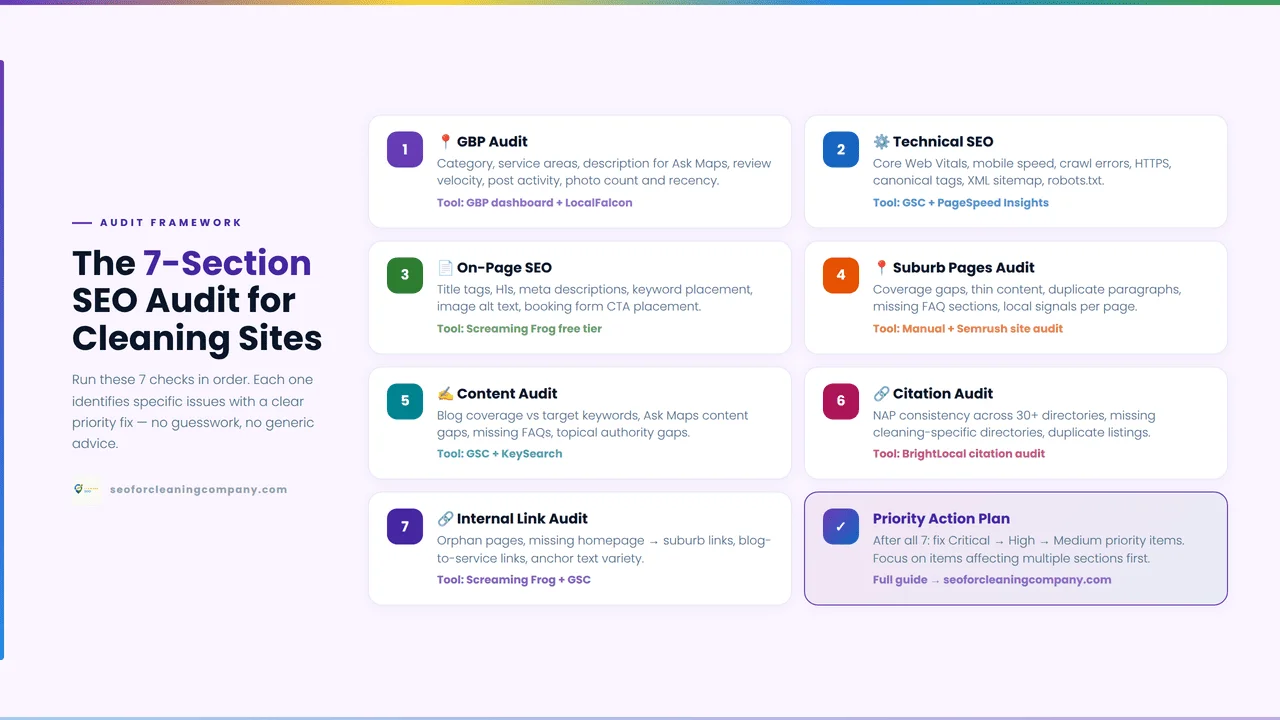
This guide gives you a complete, sequenced SEO audit process built specifically for cleaning business websites. It covers eight audit domains in priority order, starting with the highest-impact fixes and ending with the longer-term improvements. Each step uses free tools and takes a defined amount of time. The full first-time audit takes approximately three and a half hours. Quarterly re-audits take around ninety minutes.
Where an audit step reveals a problem that deserves its own deep-dive guide, this article links directly to that guide. Think of this as the master audit process and the linked articles as the specialist fix guides for each component.
Table of Contents
1. Before You Start: Tools and Setup
| KEY ANSWER You need four free tools: Google Search Console (connected to your cleaning website), Google Business Profile dashboard access, PageSpeed Insights (pagespeed.web.dev), and a spreadsheet to record findings. No paid tools are required to complete a thorough audit of a cleaning website. |
1.1. The four free tools needed
- Google Search Console (GSC): connected to your cleaning website and showing at least 30 days of data. If you have not set it up, go to search.google.com/search-console. The setup process takes under 20 minutes.
- Google Business Profile dashboard: your GBP management interface at business.google.com. You need owner or manager access to the listing.
- PageSpeed Insights: pagespeed.web.dev free, no account required. You will use this for speed and Core Web Vitals testing.
- A spreadsheet: one tab for the audit. Four columns: Finding, Severity (Critical / High / Medium / Low), Page Affected, and Recommended Fix.
1.2. Your audit spreadsheet: what to record
Every problem you find during the audit goes into the spreadsheet immediately. Do not rely on memory. A finding is critical if it is currently preventing a page from generating leads a suburb page blocked from indexing, a GBP with the wrong primary category. A finding is high if it is actively suppressing rankings. A finding is medium or low if it is an improvement opportunity that does not currently block lead generation.
After completing all eight steps, your spreadsheet becomes the input for the prioritisation matrix in Step 9.
1.3. First-time vs. quarterly re-audit
A first-time audit covers all eight steps and takes approximately three and a half hours. A quarterly re-audit focuses on the areas most likely to have changed GBP configuration, new page indexation, and Core Web Vitals and takes approximately ninety minutes. The steps are the same; the depth of investigation per step decreases once baseline findings are established and fixed.
| STEP1 | How to Audit a Cleaning Company Website for SEO: Google Business Profile Audit |
| KEY ANSWER Start your cleaning website SEO audit with Google Business Profile it is the highest-leverage local SEO asset and the most commonly misconfigured element. Check primary category, services section completeness, photo recency, review velocity, posting frequency, Q&A content, and NAP consistency with your website. |
GBP problems are the most common and most impactful source of missed cleaning leads. A cleaning business can gain more enquiries by fixing GBP configuration errors in thirty minutes than by fixing website technical issues in three hours. This is why the GBP audit is always Step 1.
Open your GBP dashboard at business.google.com and check the following seven items:
| GBP Check 1: Primary category Pass: Primary category is set to ‘House Cleaning Service,’ ‘Commercial Cleaning Service,’ ‘Carpet Cleaning Service,’ or another specific cleaning vertical, not the generic ‘Cleaning Service.’Fail: If the primary category is ‘Cleaning Service’ or ‘Local Business,’ update it immediately. An incorrect primary category is the single most common reason a cleaning business does not appear for specific service queries. See the Google Maps ranking guide for the correct category per vertical. |
| GBP Check 2: Services section Pass: Services section contains every cleaning service you offer, named using customer search language (‘bond cleaning,’ ‘end-of-lease cleaning,’ ‘vacate clean,’ ‘deep clean’) with a price range and brief description for each.Fail: If the services section is empty or uses internal naming rather than customer search terms, rebuild it. Each service entry is a keyword eligibility signal for specific queries. |
| GBP Check 3: Photo recency. Pass: At least one new photo has been uploaded in the past 30 days. The most recent photo shows a real job, a team member, or a before/after result not a stock image. Fail: If the most recent photo is older than 30 days, upload one immediately after completing this audit. Photo recency is a GBP activity signal. Listings with recent photos consistently outperform stale galleries. |
| GBP Check 4: Review velocity. Pass: At least one new Google review has arrived in the past two weeks. The weekly average is four or more new reviews. Fail: If no review has arrived in the past two weeks, your review collection system is broken. This is a critical local SEO finding. Address the review automation system immediately after the audit. |
| GBP Check 5: Post activity. Pass: A GBP post has been published in the past seven days. Fail: If the most recent post is older than two weeks, your posting cadence has lapsed. GBP posts are a weekly activity signal. Resume the four-post rotation described in the Google Maps ranking guide. |
| GBP Check 6: Q&A section Pass: The Q&A section contains at least five pre-populated questions and answers covering: pricing, service inclusions, trust/insurance, suburbs served, and booking process. Fail: If the Q&A section is empty, populate it after this audit. Unanswered Q&A sections can receive answers from anyone — including competitors or inaccurate third parties. |
| GBP Check 7: NAP consistency. Pass: Your GBP business name, phone number, and website URL exactly match what appears on your website footer, your schema markup, and your top citation directories. Fail: Any difference, even ‘Street’ vs ‘St’ or a missing country code, is a NAP inconsistency that weakens entity resolution. Record every inconsistency found and fix them all in the same session. |
Record all failed checks in your spreadsheet as High or Critical severity. Move to Step 2.
| STEP2 | Technical Audit Crawl, Speed, and Core Web Vitals⏱ Estimated time: 45 minutes |
| KEY ANSWER The technical audit covers three components in sequence: crawl error check in GSC Page Indexing report (15 min), website speed test in PageSpeed Insights (15 min), and Core Web Vitals assessment in the GSC Core Web Vitals report (15 min). Critical technical failures suppress suburb page rankings regardless of content quality. |
Technical Check 1: Crawl errors GSC Page Indexing report (15 minutes)
In GSC, go to Indexing > Pages. Look at the ‘Why pages aren’t indexed’ table. Scan for rows that include your service pages or suburb pages. Record any of these three findings as Critical severity:
- Service pages or suburb pages listed under ‘Crawled currently not indexed’: Google has read the page and excluded it. Most common cause on cleaning websites: thin suburb page content or duplicate suburb templates.
- Service pages or suburb pages listed under ‘Not found (404)’: the page has been deleted or its URL changed. Google is trying to visit a page that no longer exists.
- Any pages showing server errors (5xx): your hosting cannot respond to Google’s crawl requests. This reduces how frequently Google crawls your entire site.
| DEEP-DIVE GUIDE: For the complete crawl error diagnosis and fix process, see: How to Fix Crawl Errors on a Cleaning Business Website (Google Search Console Guide) covers every error type with cleaning-specific fixes. |
Technical Check 2: Website speed PageSpeed Insights (15 minutes)
Go to pagespeed.web.dev. Test your homepage URL first, then test one suburb page URL. Check the Mobile score for each. Record findings:
- Mobile score 0–49: Critical severity. Your site is losing visitors before they read your content. Fix before other optimisations.
- Mobile score 50–89: High severity. Improvement needed. Not an immediate lead-blocker, but is suppressing rankings via Core Web Vitals failure.
- Mobile score 90–100: Pass. No action needed.
| DEEP-DIVE GUIDE: For the complete cleaning website speed fix process, see: Website Speed for Cleaning Companies: Why a Slow Site Costs You Bookings, which covers image optimisation, WordPress plugins, Elementor settings, and hosting recommendations. |
Technical Check 3: Core Web Vitals GSC report (15 minutes)
In GSC, go to Experience > Core Web Vitals. Open the Mobile report. Check the status of your primary URL groups, the groups containing your service pages and suburb pages. Record:
- Any URL group showing ‘Poor’ status: Critical severity. Suburb pages in this group are at a ranking disadvantage compared to faster competitor pages for the same keyword.
- Any URL group showing ‘Needs Improvement’: High severity. Addressed in the 90-day plan.
- ‘Good’ status for all URL groups: Pass.
| DEEP-DIVE GUIDE: For the complete Core Web Vitals diagnosis and fix process, see: Core Web Vitals for Cleaning Company Websites: What Actually Matters covers LCP, CLS, and INP with Elementor-specific fixes and superb page template optimisation. |
| STEP3 | On-Page SEO Audit⏱ Estimated time: 30 minutes |
| KEY ANSWER Check title tags, H1 headings, meta descriptions, and schema markup on your five most important pages: homepage, your primary service pages, and your highest-traffic suburb page. On-page problems on these pages directly suppress cleaning enquiry volume. |
On-page SEO for cleaning websites has specific format requirements that differ from generic on-page guidance. A title tag for a bond cleaning service page must include both the service keyword and the city within 60 characters. A suburb page H1 must include the suburb name. Apply these checks to your five most commercially important pages.
1.4. Which five pages to audit first
- Your homepage
- Your bond cleaning (or primary service) page
- Your house cleaning (or second service) page
- Your commercial cleaning page (if applicable)
- Your highest-traffic suburb page (check GSC Performance > Pages for the suburb page with most clicks)
On-Page Check 1: Title tags
For service pages: the title tag must include the primary service keyword and the city within the first 60 characters. Example: ‘Bond Cleaning Sydney | [Business Name]’ service keyword first, city second, brand name last.
For suburb pages: the title tag must include the service keyword and the suburb name. Example: ‘Bond Cleaning Newtown | [Business Name].’
Check each of the five pages by viewing the page source (right-click > View Page Source > search for ‘title’). Record any page where the title tag is generic (‘Home’ or ‘[Business Name]’), missing the city/suburb, or over 65 characters.
On-Page Check 2: H1 headings
Each page must have exactly one H1 tag. For service pages, the H1 should include the service keyword and city. For suburb pages, the H1 must include the suburb name. Check by right-clicking each page and searching the source for ‘<h1’.
Record as High severity: pages with no H1, pages with multiple H1 tags, or suburb pages with an H1 that does not include the suburb name.
On-Page Check 3: Meta descriptions
Meta descriptions for cleaning pages should be 140–155 characters, written in conversational language, and include the service type, the city or suburb, and a call to action. Example: ‘Professional bond cleaning in Newtown. We guarantee your full bond return. Book online or call for a same-day quote.’
Check the five pages. Record as Medium severity: pages with no meta description, meta descriptions over 160 characters, or generic descriptions that do not mention the service or location.
On-Page Check 4: Schema markup
Check whether the CleaningService schema is present on your homepage and service pages using the Rich Results Test (search.google.com/test/rich-results). Paste each URL and look for a CleaningService or LocalBusiness detected structured data block.
- No schema detected: High severity. The CleaningService schema is absent.
- LocalBusiness detected (not CleaningService): Medium severity. The schema is present but uses the wrong type.
- CleaningService detected with no errors: Pass.
| DEEP-DIVE GUIDE: For the complete schema implementation process, see: Schema Markup for Cleaning Companies: How to Add LocalBusiness Structured Data, which covers RankMath setup, SAB configuration, AggregateRating, and suburb page Service schema. |
| STEP4 | Suburb Page Audit⏱ Estimated time: 30 minutes |
| KEY ANSWER Check every suburb page for: indexation status in GSC, inbound internal link count, content length, canonical tag, and Core Web Vitals on the template. Any suburb page failing two or more of these checks is a ranking problem requiring immediate attention. |
Suburb pages are the primary ranking assets for a cleaning business and the most commonly broken page type. This step audits every suburb page systematically. Build a tab in your spreadsheet with one row per suburb page before starting.
1.5. How to run the suburb page audit efficiently
List every suburb page URL in your spreadsheet. For a cleaning website with 20 suburb pages, this step takes 30 minutes. For 50 or more suburb pages, focus on the suburb pages in your highest-priority service areas first and complete the remainder in subsequent audit cycles.
For each suburb page, run the following five checks:
| Suburb Check 1: Indexation status Pass: GSC URL Inspection Tool shows ‘URL is on Google’ for this suburb page. Fail: If the URL Inspection Tool shows ‘URL is not on Google,’ record as Critical. The page is invisible to search. Check the reason given and refer to the crawl errors guide for the specific fix. |
| Suburb Check 2: Inbound internal link count Pass: GSC Links report shows at least 2 inbound internal links for this suburb page, one from the parent service page and one from a blog post. Fail: If inbound links are 0 or 1, record as High severity. The suburb page is orphaned or underlinked. Add the mandatory links immediately after this audit. See the internal linking guide for the correct process. |
| Suburb Check 3: Content length and uniqueness. Pass: The suburb page contains at least 400 words of unique content content that does not appear verbatim on any other suburb page. Fail: If the page is under 400 words, or if the content is the same template text as other suburb pages with only the suburb name changed, record as High severity. This is the most common cause of ‘crawled not indexed’ status on suburb pages. |
| Suburb Check 4: Canonical tag. Pass: The canonical tag on the suburb page points to itself (self-referential canonical). Check by viewing the page source and searching for ‘canonical.’Fail: If the canonical tag points to another page (common when Yoast or RankMath settings force canonicalisation to the parent service page), record as High severity. The suburb page is deferring its ranking signal to a different URL. |
| Suburb Check 5: Core Web Vitals on the template. Pass: The suburb page template passes Core Web Vitals in the GSC Mobile Core Web Vitals report (covered in Step 2). Fail: If the suburb page URL group is in Poor or Needs Improvement status, record as High severity for every suburb page using that template — a single template fix resolves all of them simultaneously. |
| DEEP-DIVE GUIDE: For the complete suburb page diagnosis and fix process, see: How to Fix Crawl Errors on a Cleaning Business Website (suburb page section) and Internal Linking for Cleaning Company Websites (suburb page linking rules). |
| STEP5 | Content Audit Thin Pages and Duplicate Templates⏱ Estimated time: 20 minutes |
| KEY ANSWER In the GSC Performance report, filter for pages with deep impressions but low click-through rate. These are pages Google is showing, but visitors are not clicking. Then check for blog posts with zero impressions 90 days after publication, these are content Google has decided is not worth showing. |
1.6. How to use GSC Performance data as a content quality diagnostic
Go to GSC > Search Results. Click Pages. Sort by Impressions (highest first). Look for two patterns:
Pattern 1: High impressions, low clicks: a page appearing thousands of times in search results but generating almost no clicks. For cleaning websites, this is almost always a title tag or meta description problem. The page is ranking, but the search result listing is not compelling enough to click. Record as Medium severity.
Pattern 2: Zero impressions pages: blog posts and suburb pages that appear in your spreadsheet but have no GSC impression data 90 or more days after publication. These pages are not appearing in search results at all. The cause is either thin content (Google has decided the page is not worth serving) or an indexation problem (covered in Step 2). Record as High severity.
1.7. Detecting duplicate suburb page templates
Open three or four of your suburb pages in separate browser tabs. Read the first two paragraphs of each. If the text is identical or near-identical across pages with only the suburb name changed, you have a duplicate template problem. Google identifies this pattern and reduces the number of pages from the same template it chooses to index.
Record this as High severity if it affects more than three suburb pages. The fix is differentiation, adding unique suburb-specific content to each page. This is a 60-day content project, not a same-day fix.
1.8. The improve/consolidate/noindex decision framework
Improve: pages that rank for some queries but have thin content. Add genuine depth, unique suburb information, expanded service descriptions, and FAQ content specific to that location.
Consolidate: multiple thin pages covering the same service in overlapping areas. Merge them into one stronger page and redirect the thin versions to the consolidated page.
Noindex: placeholder pages with under 200 words and no unique content that you cannot develop in the next 60 days. Temporarily noindex them to prevent them from dragging down your overall site quality signal. Remove the noindex tag when you add full content.
| STEP6 | Review and Citation Audit⏱ Estimated time: 20 minutes |
| KEY ANSWER Check your Google review count and most recent review date if no review has arrived in the past two weeks, your review collection system is broken. Then check your top five citation directories for NAP consistency. Name, phone, and website URL must be identical across all platforms. |
1.9. Review audit: what to check
Open your GBP listing in Google Maps (search your business name). Note: total review count, star rating average, and the date of the most recent review. Then compare against these benchmarks:
- Most recent review older than 14 days: Critical severity. Review velocity has stopped. Your collection system is not functioning. Fix immediately.
- Total review count under 25: High severity for a business operating for more than 6 months. You are below the threshold where Google’s LSA algorithm generates consistent lead flow.
- Star rating under 4.2: High severity. Both map pack visibility and LSA ranking are suppressed by low average ratings.
1.10. Citation audit: NAP consistency across directories
Open each of the following directories in a separate browser tab and search for your business. Compare what each directory shows against your GBP (which is your master NAP reference):
| 🇦🇺 Australia: Hipages.com.au | Airtasker.com.au | Oneflare.com.au | ServiceSeeking.com.au | YellowPages.com.au |
| 🇺🇸 United States: Angi.com | Thumbtack.com | HomeAdvisor.com | Yelp.com | BetterBusinessBureau.org |
| 🇬🇧 United Kingdom: Checkatrade.com | RatedPeople.com | MyBuilder.com | Bark.com | Yell.com |
For each directory: compare business name, phone number (including country code format), and website URL. Record every inconsistency as High severity. Even minor differences and’ vs ‘&’ in your business name, or ‘+61’ vs ‘0’ prefix on your phone number are NAP inconsistencies that weaken your local authority signals.
| STEP7 | Internal Link Audit⏱ Estimated time: 20 minutes |
| KEY ANSWER Run the GSC Internal Links report. Look for three problems: suburb pages with zero inbound internal links (orphaned), service pages with fewer than five inbound links (underlinking), and pages published in the past 30 days with no links pointing to them (new page orphans). |
1.11. How to access the GSC Internal Links report
In GSC, go to Links in the left menu. The ‘Internal links’ section shows all pages on your cleaning website ranked by the number of internal links pointing to them. The pages at the bottom of this list with the fewest inbound links are your most vulnerable pages.
Internal Link Check 1: Orphaned suburb pages
Scroll to the bottom of the Internal Links list. Any suburb page not appearing in the list at all has zero inbound internal links it is orphaned. Cross-reference with your suburb page list. Record every orphaned suburb page as Critical severity.
Fix: on publication day for any future suburb page, immediately add a link from the parent service page and from the most relevant existing blog post. For current orphans, apply these two links before the next audit.
Internal Link Check 2: Underlinking on service pages
Find each of your primary service pages in the Internal Links list. A service page that is the primary conversion asset for a cleaning vertical, such as bond cleaning, house cleaning, and commercial cleaning, should have at least five inbound internal links from blog posts, suburb pages, the homepage, and case studies.
A service page with fewer than five inbound internal links is underlinking. Record as High severity. Fix by identifying which existing blog posts and subpages can naturally add a contextual link to the service page.
Internal Link Check 3: New page orphans
In your audit spreadsheet, list every page published in the past 30 days. Cross-reference with the Internal Links report. Any page published in the past 30 days that does not appear in the Internal Links report has no inbound links. Record as High severity. Fix before the next audit.
| DEEP-DIVE GUIDE: For the complete internal linking system and monthly audit process, see: Internal Linking for Cleaning Company Websites: The Exact System That Transfers Authority covers page hierarchy, suburb page rules, blog post linking, anchor text, and the full 30-minute GSC audit. |
| STEP8 | Competitor Gap Audit⏱ Estimated time: 20 minutes |
| KEY ANSWER Search your three primary target keywords on Google. Identify the top-ranking competitor for each. Compare their GBP against yours: review count, photo recency, post activity. Then check their website: suburb page count, service page depth, blog content. These gaps are your ranking opportunities. |
A competitor gap audit tells you not just what is wrong with your cleaning website but how far you need to go to outrank the businesses currently above you. Without this step, your audit is diagnostic but not competitive.
1.12. How to identify your real cleaning competitors
Your real competitors are not the businesses you see at industry events or on Facebook groups. They are the businesses ranking above you for the specific keywords you want to rank for, in the specific suburbs you target.
Open a private browser window (to avoid personalised results). Search your three most important target keywords for example, ‘bond cleaning Sydney,’ ‘house cleaning Newtown,’ and ‘commercial cleaning Melbourne.’ For each search, identify the top two or three organic and map pack results that are not directories or aggregator sites. These are your real competitors.
1.13. Competitor GBP gap comparison
For the top-ranking competitor in each search, click through to their GBP listing. Note in your spreadsheet:
- Review count: theirs vs. yours
- Most recent review date: Are they getting reviews more recently than you?
- Most recent photo date: Are their photos more recent than yours?
- Most recent GBP post: Are they posting more frequently than you?
Any area where a top-ranking competitor significantly outperforms you is a gap that is likely contributing to their ranking advantage. Record these gaps as Medium to High severity depending on the magnitude of the difference.
1.13. Competitor website gap comparison
Open the top-ranking competitor’s website. In your spreadsheet, note:
- Suburb page count: how many suburb pages do they have vs. yours? If they have 40 suburb pages and you have 12, suburb page building is a clear content gap.
- Service page depth: Are their service pages significantly longer or more detailed than yours?
- Blog content: What topics have they covered that you have not? Any topic they rank for that you have not yet published is a content gap.
The competitor gap audit converts abstract audit findings into a specific competitive target. A cleaning business owner who knows their top competitor has 180 reviews (vs their 40) and 35 suburb pages (vs their 12) has a clear picture of the two highest-impact investments to make over the next 90 days.
2. Prioritisation Matrix: What to Fix First After the Audit
| KEY ANSWER Fix in this order: (1) GBP configuration errors that affect leads immediately; (2) crawl errors on service and suburb pages, blocked pages generate zero leads; (3) orphaned suburb pages that rank slowly without inbound links; (4) on-page issues on service pages; (5) content quality problems over 60 days. |
After completing all eight audit steps, your spreadsheet contains a list of findings. Most cleaning websites produce between 10 and 25 findings on a first audit. You cannot fix 25 things simultaneously. Use the following priority order built around the cleaning business lead impact to sequence your work.
| PRIORITY 1: GBP configuration errors. Lead impact: Highest GBP is visible to every searching client before they reach your website | Effort: Low changes made directly in GBP dashboard | Time to result: Days to result. Fix: Update primary category, rebuild services section, check NAP consistency. These fixes are immediate and free. |
| PRIORITY 2: Crawl errors blocking service and suburb pages. Lead impact: Highest blocked pages generate exactly zero organic leads | Effort: Low-Medium, most crawl errors fixed in WordPress plugin settings | Time to result: 1–4 weeks after fix (CrUX data takes up to 28 days to update). Fix: Fix thin suburb pages, resolve canonical conflicts, and address server errors. Request indexing in GSC after each fix. |
| PRIORITY 3: Orphaned suburb pages (zero inbound links)Lead impact: High orphaned suburb pages rank significantly slower than linked pages | Effort: Low, adding internal links takes 5 minutes per suburb page | Time to result: 30–60 days for measurable ranking improvement. Fix: Add parent service page link and one blog post link for every orphaned suburb page. Start with the suburbs closest to your primary metro area. |
| PRIORITY 4: On-page issues on primary service pages. Lead impact: High correct title tags and H1S improve both rankings and click-through rate | Effort: Low changes made in WordPress editor or SEO plugin | Time to result: 2–6 weeks for ranking impact. Fix: Fix title tags, H1S, and meta descriptions on the five highest-traffic commercial pages. Add CleaningService schema if absent. |
| PRIORITY 5: Content quality improvements (thin and duplicate suburb pages)Lead impact: Medium content quality affects long-term ranking stability | Effort: Medium-High requires genuine content writing per suburb page | Time to result: 60–120 days for full impact. Fix: Add unique suburb-specific content to thin pages. Start with the suburb pages closest to ranking (those with impressions but low clicks in GSC Performance). |
3. 90-Day Post-Audit Action Plan
| KEY ANSWER Days 1–7: fix all GBP configuration errors and request indexing for suburb pages blocked by crawl errors. Days 8–30: add internal links to orphaned suburb pages, fix on-page issues on service pages. Days 31–90: improve thin suburb page content, build new suburb pages to close competitor gaps. |
Days 1–7: the immediate fixes
- Update the GBP primary category if incorrect.
- Rebuild the GBP services section with customer search language.
- Fix any NAP inconsistencies found in the citation audit.
- For every suburb page blocked by a crawl error: apply the fix from the crawl errors guide, then request indexing via the GSC URL Inspection Tool.
- For every orphaned suburb page: add a link from the parent service page immediately.
- Activate or repair your review collection system if review velocity has stopped.
Days 8–30: the structural fixes
- For every orphaned suburb page: add a blog post link in addition to the service page link already added in Week 1.
- Fix title tags, H1S, and meta descriptions on the five most commercially important pages.
- Add the CleaningService schema to the homepage and primary service pages if absent (use RankMath Local SEO module).
- Add the AggregateRating schema with the current review data.
- Fix Core Web Vitals failures on the suburb page template (disable Elementor animations, add image dimensions, enable WP Rocket defer JavaScript).
- Resume weekly GBP posts and photo uploads if lapsed.
Days 31–90: the content and competitive work
- Improve the five suburb pages with the deepest impressions but lowest CTR these are closest to ranking and need title/meta or content improvements.
- Add unique content to the three most heavily duplicated suburb page templates.
- Publish new suburb pages to close the competitor page count gap if your top competitor has 35 suburb pages and you have 12, begin closing that gap at a rate of one new suburb page per week.
- Update blog posts that have zero impressions with improved content or noindex them temporarily.
- Run a partial re-audit at the end of day 90 to confirm Priority 1–3 findings are resolved.
4. How Often Should a Cleaning Business Audit Its Website?
| KEY ANSWER: Run a full audit every six months. Run a partial audit covering GBP, crawl errors, and new page links every month. Run an immediate partial audit whenever a new suburb page is published, a plugin is updated, or a competitor suddenly outranks you for a target keyword. |
4.1. The full audit: every six months
A full audit covering all eight steps takes three and a half hours the first time and approximately two hours on subsequent runs because baseline findings have been fixed and you are checking for new issues rather than doing a complete discovery. Run a full audit every six months, or after a significant Google algorithm update that coincides with ranking changes on your cleaning website.
4.2. The partial monthly audit: 30 minutes
Every month, run four checks: GBP configuration (has anything changed or lapsed?), GSC Page Indexing report (any new crawl errors on service or suburb pages?), new page links (did every page published this month receive its mandatory inbound links?), and PageSpeed score on the most recently published suburb page. These four checks take 30 minutes and catch the most common regressions before they compound.
4.3. Event-triggered partial audits
Run an immediate partial audit when any of the following occur:
- A new suburb page is published: immediately test it with the GSC URL Inspection Tool, confirm the parent service page link is in place, and run PageSpeed on the suburb page URL.
- A WordPress or Elementor plugin is updated: immediately run PageSpeed and GSC Core Web Vitals report to check for INP or CWV regression.
- A Google algorithm update is confirmed: run a full GSC Performance report comparison (before vs. after the update date) to identify which pages gained or lost impressions.
- A competitor suddenly outranks you for a target keyword: run a competitor gap audit (Step 8) specifically for that keyword to identify what changed on their side.
Conclusion
A cleaning website SEO audit is not a one-time event. It is a diagnostic process that you repeat fully every six months, partially every month, and on specific triggers as your website and the competitive landscape evolve.
The most important outcome of this audit is not the findings list but the prioritised action sequence. Most cleaning websites have fixable problems. The ones that improve fastest are those where the business owner completes the audit, records every finding, applies the prioritisation matrix without skipping steps, and executes the 90-day plan without deferring the uncomfortable fixes.
Start with Step 1. Open your GBP dashboard. The most common and most impactful problems are there.
| Want a specialist to run this audit for your cleaning website? Get a free SEO audit at seoforcleaningcompany.com we cover all eight audit domains and deliver a prioritised action plan at no cost. |
Frequently Asked Questions
How long does a cleaning website SEO audit take?
A first-time full audit covering all eight steps takes approximately three and a half hours. Subsequent quarterly audits take around ninety minutes because baseline findings are already established. The partial monthly audit, GBP, crawl errors, new page links, and one PageSpeed test take 30 minutes.
Do I need paid SEO tools to audit a cleaning website?
No. Google Search Console, Google Business Profile dashboard, and PageSpeed Insights all free cover every audit check in this guide. Paid tools like Screaming Frog, Ahrefs, or Semrush can add depth to specific audit steps (competitor backlink analysis, comprehensive crawl data), but they are not required to complete a thorough audit of a cleaning website with under 200 pages.
What is the single most impactful audit finding for a cleaning business?
Consistently: a GBP with the wrong primary category. A cleaning business using ‘Cleaning Service’ instead of ‘House Cleaning Service’ or ‘Commercial Cleaning Service’ is limiting its map pack eligibility for the specific service queries that generate bookings. This is a two-minute fix in the GBP dashboard and is the highest-leverage change available from a cleaning website SEO audit.
How many suburb pages should a cleaning website have before auditing them?
Audit your suburb pages at any count. If you have five suburb pages, audit all five. If you have fifty, audit the highest-priority twenty-first and complete the rest over the following month. The suburb page audit becomes more valuable and more urgent as your portfolio grows, because the number of orphaned or thin pages typically increases faster than the systematic linking and content quality work keeps pace with new page publications.
What should I do if the audit reveals more problems than I can fix?
Use the prioritisation matrix. Fix Priority 1 findings (GBP errors) immediately, as they take under an hour and have the fastest lead impact. Fix Priority 2 findings (crawl errors) in Week 1. Schedule Priority 3 and 4 findings for the first 30 days. Begin Priority 5 work in Month 2. No cleaning business needs to fix everything simultaneously. Systematic execution through the priority tiers, over 90 days, produces measurable ranking improvements without overwhelming the time a cleaning business owner can realistically dedicate to SEO work.
